MA, EMA, SMMA
Moving averages (MA, EMA, SMMA) are a family of technical analysis indicators that show the average asset price over a specific period of time.
They help smooth the chart, reduce the impact of short-term volatility, and make trends easier to identify.
Main Features
- MA (Moving Average) — a simple moving average. It gives equal weight to all prices over the selected period
- EMA (Exponential Moving Average) — gives more weight to recent price values and reacts faster to changes
- SMMA (Smoothed Moving Average) — a smoother version of MA that gives more weight to recent data but smooths the chart better than EMA
Interpretation
- Moving average lines show the averaged value of the asset over the selected period
- The longer the period, the smoother the line and the slower it reacts to price changes
- The shorter the period, the more closely the indicator follows the price
How to Enable Moving Averages on the Exchange Chart
- In the exchange terminal, click Indicators
- Enter the required indicator in the search field:
- MA — simple moving average
- EMA — exponential moving average
- SMMA — smoothed moving average
Indicator Settings on the Exchange
- Click the ⚙ icon next to the indicator name
- In the Length field, set the period. The default value is 9
- Use the same period value as in the bot settings
Using in the Bot
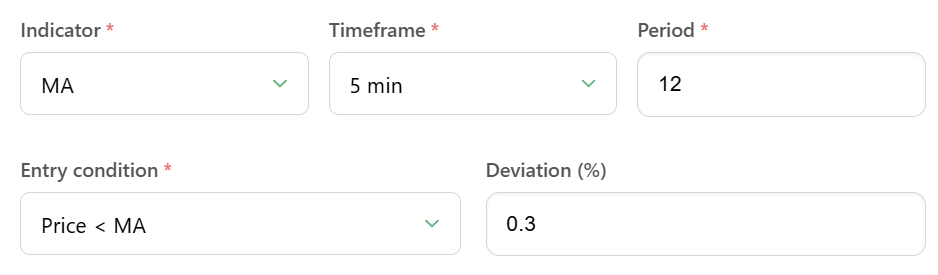
- Price > MA (EMA, SMMA) — the bot will start when the price is above the indicator line
- Price < MA (EMA, SMMA) — the bot will start when the price is below the indicator line
- You can also specify a deviation from the line as a percentage — from -10% to +10%
- For example, the condition Price > MA with a 10% deviation means that the bot will start when the price exceeds the MA line by 10%