Basic Bot Settings
When you click New bot, the basic bot settings window opens. Select the required parameters from the dropdown menus.
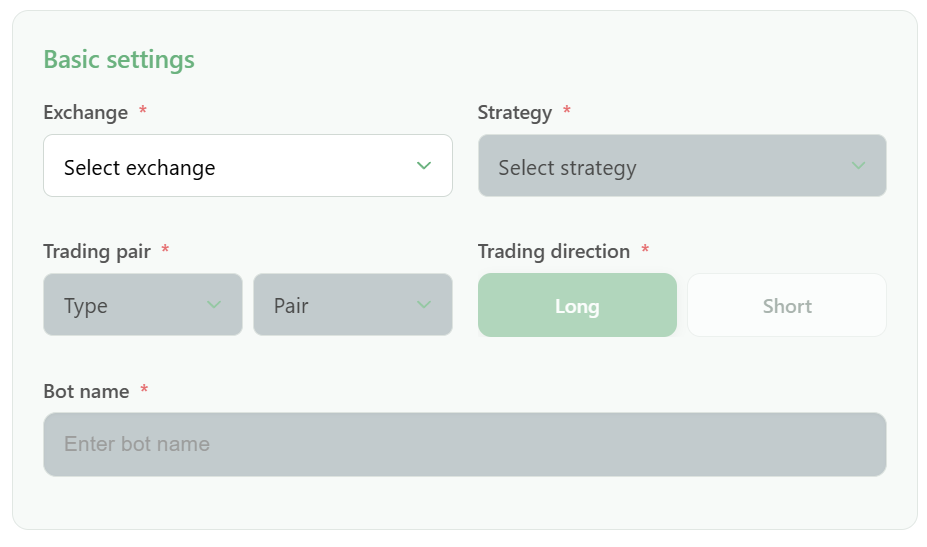
Exchange
Select the exchange:
- OKX
- Bybit
- KuCoin
Strategy
- Default Grid — standard strategies that work in one direction: Long or Short
- Auto Grid — the bot opens both Long and Short orders according to a defined algorithm. Available only for futures: COIN Futures and USDT Futures
- Dynamic Grid — a strategy with floating boundaries that automatically adjust to the price
- Indicator Grid — a specialized bot type for traders who use indicators such as EMA, RSI, MA, SMMA, ATR, ATR%, Supertrend, and others
Bot Type
Available bot types depend on the selected exchange:
- Spot — spot trading
- USDT Futures — futures trading
- Coin Futures — inverse contracts
Trading Pair
Select a trading pair.
The full list of available pairs is available in the menu or at the link: Available pairs
Trading Direction
- Long — buy
- Short — sell
- Auto — Long and Short at the same time, available for the Dynamic Grid strategy