Bot Stopping Methods and Position Closing
The following methods are available for effective bot management and position closing.
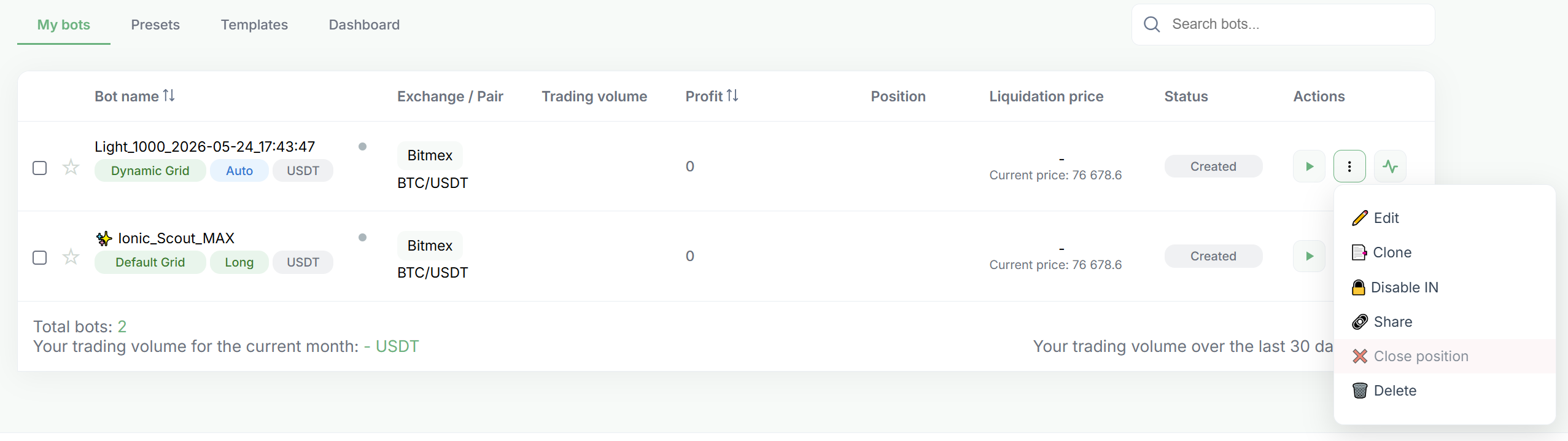
Stopping and Closing a Position Through the Interface
To fully stop the bot and close current positions, use the pause function in the bot management interface. It is located in the Actions column.
After stopping the bot, close the position by clicking Close Position in the dropdown menu immediately to the right of the pause button.
Your final profit will be equal to the value in the Profit field in the statistics, excluding funding.
Setting Take-Profit / Stop-Loss
You can set the desired profit level (Take-Profit) or loss level (Stop-Loss) so that the bot automatically closes the position when the specified value is reached in Total Current Profit.
Learn more about these settings in the help materials:
Disable IN Mode
This method allows the bot to continue working in order-closing mode without opening new orders.
Learn more about the function:
Important Warning
- It is not recommended to close positions manually on the exchange.
If you accidentally closed a position manually, stop the bot using the pause function and then delete it from the active bots list. - Any manual intervention in the bot’s operation on the exchange may disrupt its algorithm.
The bot does not recognize changes made manually on the exchange and will continue working according to the configured triggers. Closing a position manually may cause the bot to execute the opposite operation. For example, closing a Long position may open a Short position, and vice versa, which can lead to unwanted results. - If you stop the bot without closing the position in the GinArea personal account, the position remains open on the exchange.
If you stopped and deleted the bot without closing the position through the interface, the position remains active on the exchange. You will need to close it manually via the exchange terminal. - Bot in Failed Status After Position Liquidation on the Exchange
If the bot is shown as Failed after liquidation due to insufficient margin, it means it can no longer function correctly. After funding the account, you can launch a new bot. Do not try to restart the old one — it will manage an already liquidated position, which will lead to incorrect operation.