Grid Master
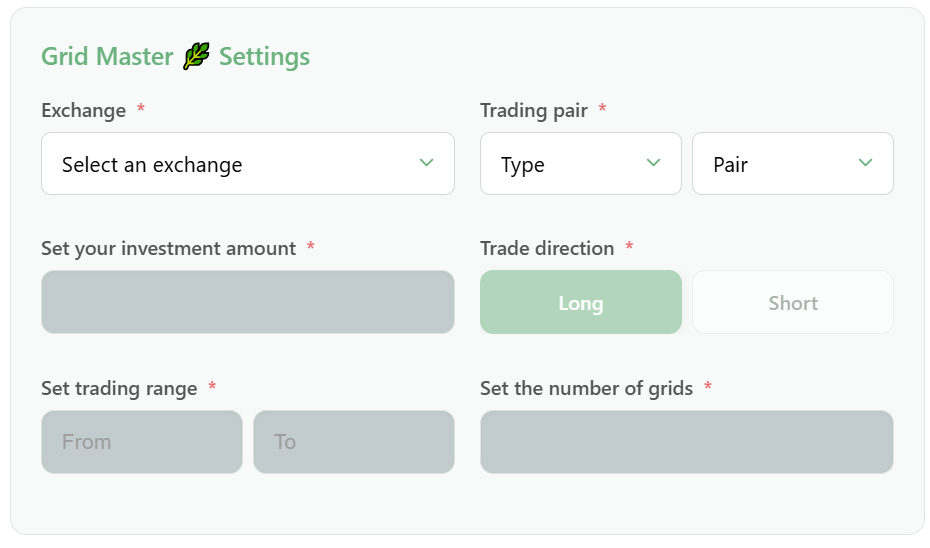
Grid Master by GinArea is a tool for automated trading within a defined price range. You set the range boundaries and the number of grids, after which the bot automatically calculates order sizes and evenly distributes them across the grid based on the investment amount. All parameters can be changed in PRO mode if needed. Maximum efficiency is achieved when the price moves within the selected range. Setup takes just a few seconds.
Available Bot Types (Bot Type)
- Spot — spot bots
- USDT Futures — futures bots
- Coin Futures — inverse bots
Grid Master Launch Parameters
- Select an exchange: Choose the exchange for trading. If the required exchange is not available, connect it using API keys in the Exchanges section.
- Select a trading pair: Choose a trading pair for trading, for example, BTCUSDT.
- Set your investment amount:
- For spot: define the investment amount the bot will use.
- For futures: specify the investment amount and leverage. The maximum position size will be calculated using the formula: Investment × Leverage.
- Set the number of grids: Specify the number of trading grids that the bot will evenly distribute within the defined price range.
- Set trading range: Set the lower and upper boundaries of the price range in which the bot will operate. If the price moves outside these boundaries, the bot will stop placing new orders.
- Side — direction:
- Long: opens a position expecting the price to rise.
- Short: opens a position expecting the price to fall.