Position Entry / Exit Settings
% Mode is enabled by default and allows you to set bot parameters as percentages. In this mode, parameters automatically adapt to changes in the asset price.
If % Mode is disabled, parameters are fixed in absolute values and remain unchanged during price fluctuations.
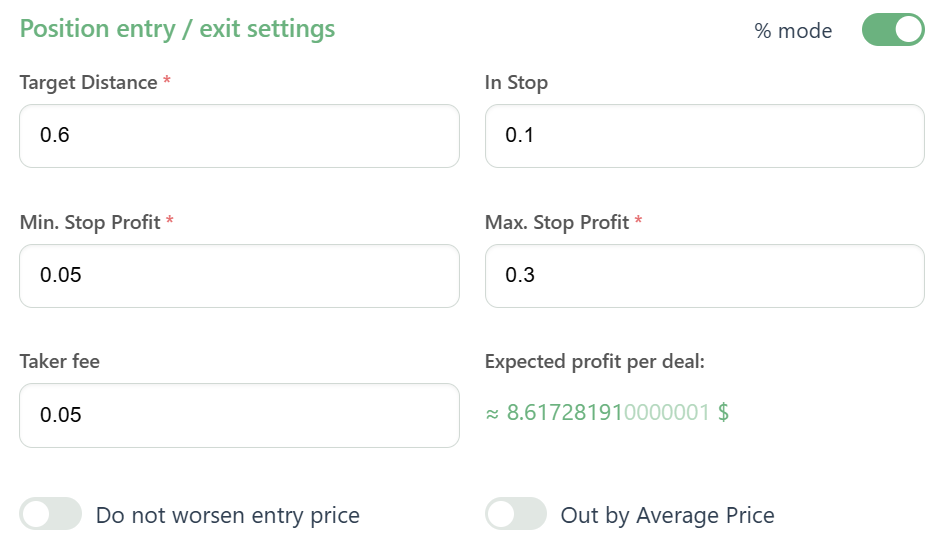
Target Distance
Target Distance is the distance from the IN order opening price to the level where the bot sets a trigger.
As soon as the price reaches the trigger at the Target Distance, the bot will set a stop-profit order at the Min. Stop Profit distance.
Min. Stop Profit
Min. Stop Profit is the minimum distance from the trigger at which the bot locks in profit.
Once the price reaches the Target Distance trigger, the bot will set a stop-profit order at the Min. Stop Profit distance. If the price pulls back by Min. Stop Profit, the bot closes the IN order, securing profit.
If Min. Stop Profit is empty, it is automatically set to zero.
When set to 0, the closing order is placed directly at the trigger level and executed at the minimum price movement (tick) beyond the stop-order level:
- Downward for Long direction
- Upward for Short direction
Max. Stop Profit
When Max. Stop Profit is enabled, each IN order will close with increasing profit using Out Stop trailing, following the price at the distance set in the Max. Stop Profit parameter.
After the trigger is activated, if there is an unclosed Out Stop, the new one merges with the previous according to position averaging: the actual profit of each separate IN order equals the projected profit.
Example of Expected Profit per Deal Calculation
Expected profit per deal = Order Size × (closing price − opening price) − ((Order Size × opening price × Taker fee) + (Order Size × closing price × Taker fee))
Where opening price is the current coin price, and closing price = current coin price + (Target Distance − Min. Stop Profit).
When IN orders are combined into an Out Stop, some orders may close at a loss, but the average closing price of all orders will be higher.
In case of significant asset price movement, potential profit per deal may become negative. The bot will switch to Failed status. To restore operation, adjust Target Distance and Min. Stop Profit.
Out by Average Price
Out by Average Price is a position-closing mode that fixes profit from the average entry point of all orders opened by the bot.
Instead of standard closing by separate orders, the bot places a single trigger at the Target Distance from the average entry price.
Available for all bot types and can be enabled or disabled at any time.
Example:
Bot buys SOL with a $10 step below $100, target 5%:
- 1st order: 1 SOL at $100
- 2nd order: 1 SOL at $90
- 3rd order: 1 SOL at $80
- 4th order: 1 SOL at $70
Average price of all orders: $85
Position closing price: $89.25 (5% above average entry point)
Do Not Worsen Entry Price
When enabled, the bot will not create new IN orders above the average entry price for Long direction, and below it for Short direction.
The average entry price must be tracked in the summary statistics. For Dynamic Auto, the average is calculated separately for each side.
Available for: Default Grid, Dynamic Grid, and Indicator Grid bots.
Do Not Worsen Entry Price Video
In Stop
In Stop is a parameter that controls when IN orders open based on price deviation.
How It Works
- If In Stop > 0, the bot opens IN orders only after the current price deviation exceeds the In Stop value.
- If the price direction changes, all active IN orders are merged into a single order with one trigger.
Example for a Long Bot
When the price is rising:
- Bot creates IN orders at Grid Step intervals and tracks price deviation with In Stop.
- The first order opens only after the price deviates by In Stop.
- All subsequent orders open according to the Grid Step.
When the price is falling:
- The first order is not opened immediately. Bot waits for a price reversal.
- The IN order opens only after the price rises by In Stop from the minimum price.
When the price moves downward without pullbacks:
- Bot does not open each separate IN order at every grid level.
- When the price reverses upward by In Stop, bot opens one combined order equal to the sum of skipped IN orders, with a trigger at Target Distance.
Advantages of In Stop
- Opens orders only after price direction changes, improving entry points.
- Useful during sharp market movements, when waiting for a reversal is necessary.
- Trailing order opening increases potential profit.
Important: available only for Default Grid and Dynamic Grid bots.
Using In Stop allows the bot to flexibly react to market changes, avoid opening orders at unfavorable points, and improve the average entry price during strong price movements.